소개
10만 개의 총알이 빗발치는 환경에서 기존 공간 분할(Spatial Partitioning) 알고리즘에 비트 배열(NativeBitArray)를 추가한 실험 기록이다.
INFO
- Unity Version: 6000.3.11 f1
- ECS Version: Entities(1.4.5), Entities Graphics(1.4.18), Unity Physics(1.4.5)
- CPU: 12th Gen Intel(R) Core(TM) i5-12600KF
- GPU: NVIDIA GeForce RTX 3060 Ti
- RAM: 16225MB
코드
ECS에 대해 간단히 소개하자면 이렇다.
조작하려는 데이터(IComponentData)를 Unity 게임 오브젝트에 부착(Authoring)할 수 있도록 하고(Baker) 동작을 수행(ISystem)하도록 지시한다.
설계할 환경은 10만 개의 총알과 2,000마리의 적 개체이다.
총알(Bullet)
csharp
public struct Bullet : IComponentData
{
    public float3 Position;
    public float3 Direction;
    public float Speed;
    public float Radius;
    public float Power;
}- 총알은 위치, 방향, 속도, 피격 반지름, 피해량을 갖는다.
csharp
partial struct BulletSystem : ISystem
{
    [BurstCompile]
    public void OnUpdate(ref SystemState state)
    {
        float deltaTime = SystemAPI.Time.DeltaTime;
        float maxDistance = 1000f * 1000f;

        var endSimulationEntityCommandBuffer = SystemAPI.GetSingleton<EndSimulationEntityCommandBufferSystem.Singleton>();
        var endSimulationEntity = endSimulationEntityCommandBuffer.CreateCommandBuffer(state.WorldUnmanaged);
        foreach (var (transform, bullet, entity) in SystemAPI.Query<RefRW<LocalTransform>, RefRO<Bullet>>().WithEntityAccess())
        {
            transform.ValueRW.Position += bullet.ValueRO.Direction * bullet.ValueRO.Speed * deltaTime;
            if (math.distancesq(transform.ValueRO.Position, float3.zero) > maxDistance)
            {
                endSimulationEntity.DestroyEntity(entity);
            }
        }
    }
}- 매 프레임 총알의 좌표를
Position += Direction * Speed * deltaTime만큼 변경한다. maxDistance를 벗어난 적을DestroyEntity()하기 위해 커맨드 버퍼를 가져온다.maxDistance를 제곱한 이유는 제곱근 계산을 하지 않기 위해 제곱한 결과 그대로 비교하기 위함이다.
WARNING
현재 foreach로 Bullet을 순회하는 도중에 DestroyEntity()를 호출하면 구조적 변경이 발생하여 에러가 발생합니다.
따라서 ECB(Entity Command Buffer)를 사용하여 파괴 명령을 예약하고,
해당 시스템 루프가 끝난 뒤 EndSimulationEntityCommandBufferSystem에서 안전하게 일괄 삭제합니다.
적(Enemy)
csharp
public struct Enemy : IComponentData
{
    public float MoveSpeed;
}

partial struct EnemySystem : ISystem
{
    private Random _random;

    public void OnCreate(ref SystemState state)
    {
        _random = new Random((uint)System.DateTime.Now.Ticks);
    }

    [BurstCompile]
    public void OnUpdate(ref SystemState state)
    {
        float deltaTime = SystemAPI.Time.DeltaTime;
        float range = 1000f * 1000f;

        foreach (var (transform, enemy) in SystemAPI.Query<RefRW<LocalTransform>, RefRO<Enemy>>())
        {
            float2 random2D = _random.NextFloat2Direction();
            float3 moveDirection = new float3(random2D.x, 0, random2D.y);

            transform.ValueRW.Position += moveDirection * enemy.ValueRO.MoveSpeed * deltaTime;
            if(math.lengthsq(transform.ValueRO.Position) > range)
            {
                transform.ValueRW.Position = float3.zero;
            }
        }
    }
}- 적도 총알과 같은 원리로 움직인다.
- 매 프레임 무작위 방향을 정하고 움직인다.
range를 벗어나면 원점으로 돌아온다.
총알 생성기
csharp
public struct BulletSpawner : IComponentData
{
    public Entity BulletPrefab;
    public int SpawnCount;
}- 생성할 개체와 생성 숫자를 갖는 생성기를 만든다.
csharp
class BulletSpawnerAuthoring : MonoBehaviour
{
    public GameObject bulletPrefab;
    public int spawnCount;
}

class BulletSpawnerAuthoringBaker : Baker<BulletSpawnerAuthoring>
{
    public override void Bake(BulletSpawnerAuthoring authoring)
    {
        var entity = GetEntity(TransformUsageFlags.None);

        AddComponent(entity, new BulletSpawner
        {
           BulletPrefab = GetEntity(authoring.bulletPrefab, TransformUsageFlags.Dynamic),
           SpawnCount = authoring.spawnCount
        });
    }
}- 생성기는 움직이지 않으니
TransformUsageFlags.None BulletPrefab은 움직이니TransformUsageFlags.Dynamic
적 생성기
csharp
public struct EnemySpawner : IComponentData
{
    public Entity EnemyPrefab;
    public int SpawnCount;
}- 생성할 개체와 생성할 숫자를 정한다.
csharp
partial struct EnemySpawnerSystem : ISystem
{
    private Random _random;
    private EntityQuery _enemyQuery;

    public void OnCreate(ref SystemState state)
    {
        state.RequireForUpdate<EnemySpawner>();

        _random = new Random((uint)System.DateTime.Now.Ticks);
        _enemyQuery = state.GetEntityQuery(ComponentType.ReadOnly<Enemy>());
    }

    [BurstCompile]
    public void OnUpdate(ref SystemState state)
    {
        int currentEnemyCount = _enemyQuery.CalculateEntityCount();
        var spawner = SystemAPI.GetSingleton<EnemySpawner>();
        int targetCount = spawner.SpawnCount;

        if (currentEnemyCount < targetCount)
        {
            int size = targetCount - currentEnemyCount;
            NativeArray<Entity> enemies = new NativeArray<Entity>(size, Allocator.Temp);
            state.EntityManager.Instantiate(spawner.EnemyPrefab, enemies);
            foreach (var enemy in enemies)
            {
                float2 randomPos2D = _random.NextFloat2Direction() * _random.NextFloat(0f, 990f);
                float3 spawnPosition = new float3(randomPos2D.x, 0, randomPos2D.y);

                state.EntityManager.SetComponentData(enemy, LocalTransform.FromPositionRotationScale(spawnPosition, quaternion.identity, 15.0f));
            }

            enemies.Dispose();
        }
    }
}- 생성기에서 설정한 적의 개체 수를 유지하기 위해 매 프레임 Enemy를
Instantiate()한다. - 모든 적의 좌표를 무작위로 설정한다.
foreach가 끝나면 반드시 Enemy 배열을Dispose()한다.
중간 점검
Profiler를 통해 중간 점검을 해본다. 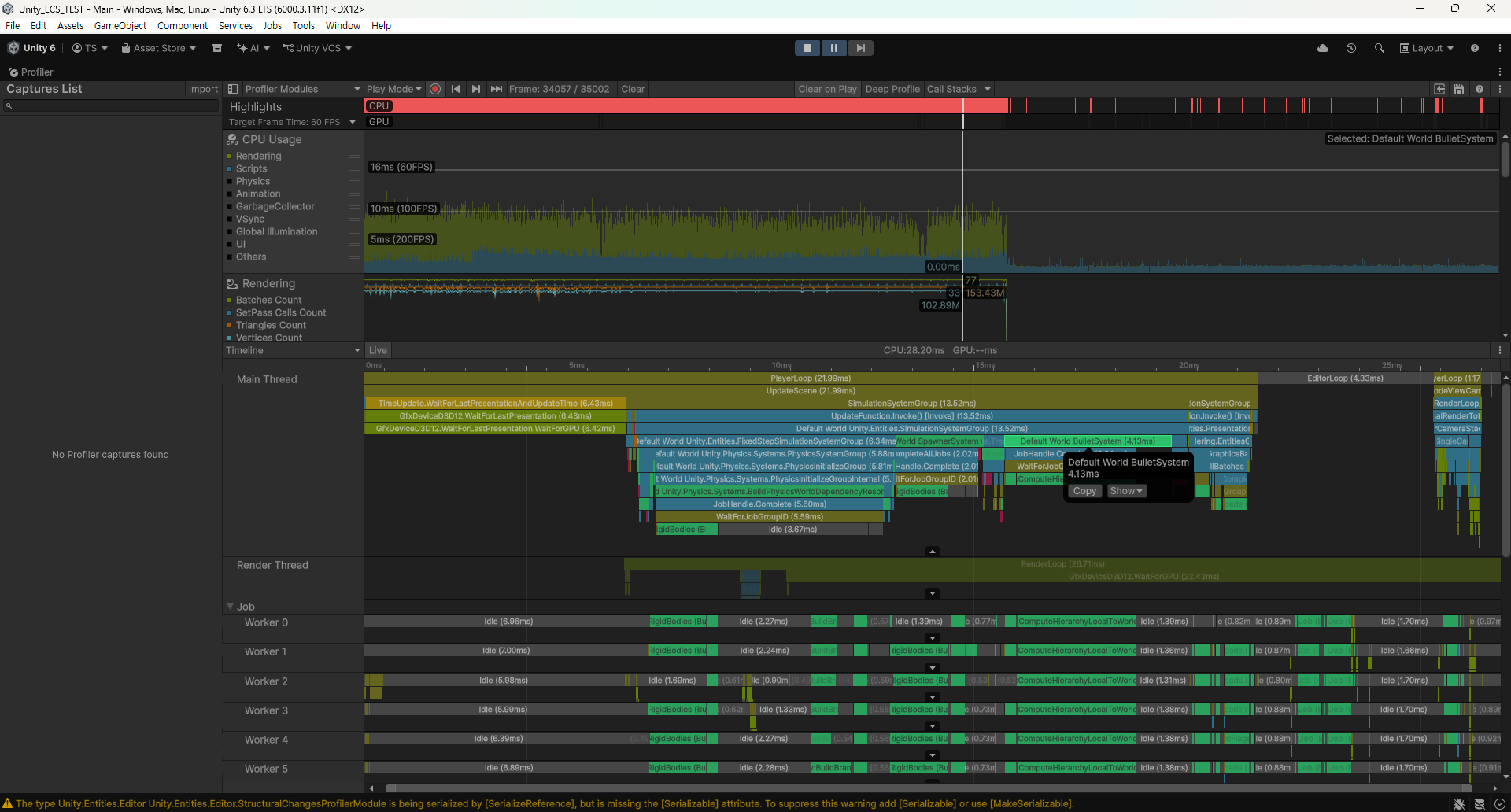
- 작성한 각각의 생성기 시스템이 Main Thread에서 작동함을 확인할 수 있다.
- 하단의 Job에서
RigidBodies가 점유하는 것을 볼 수 있다. - 우리는 거리 기반 충돌처리를 할 것이기 때문에
Collider는 필요하지 않다.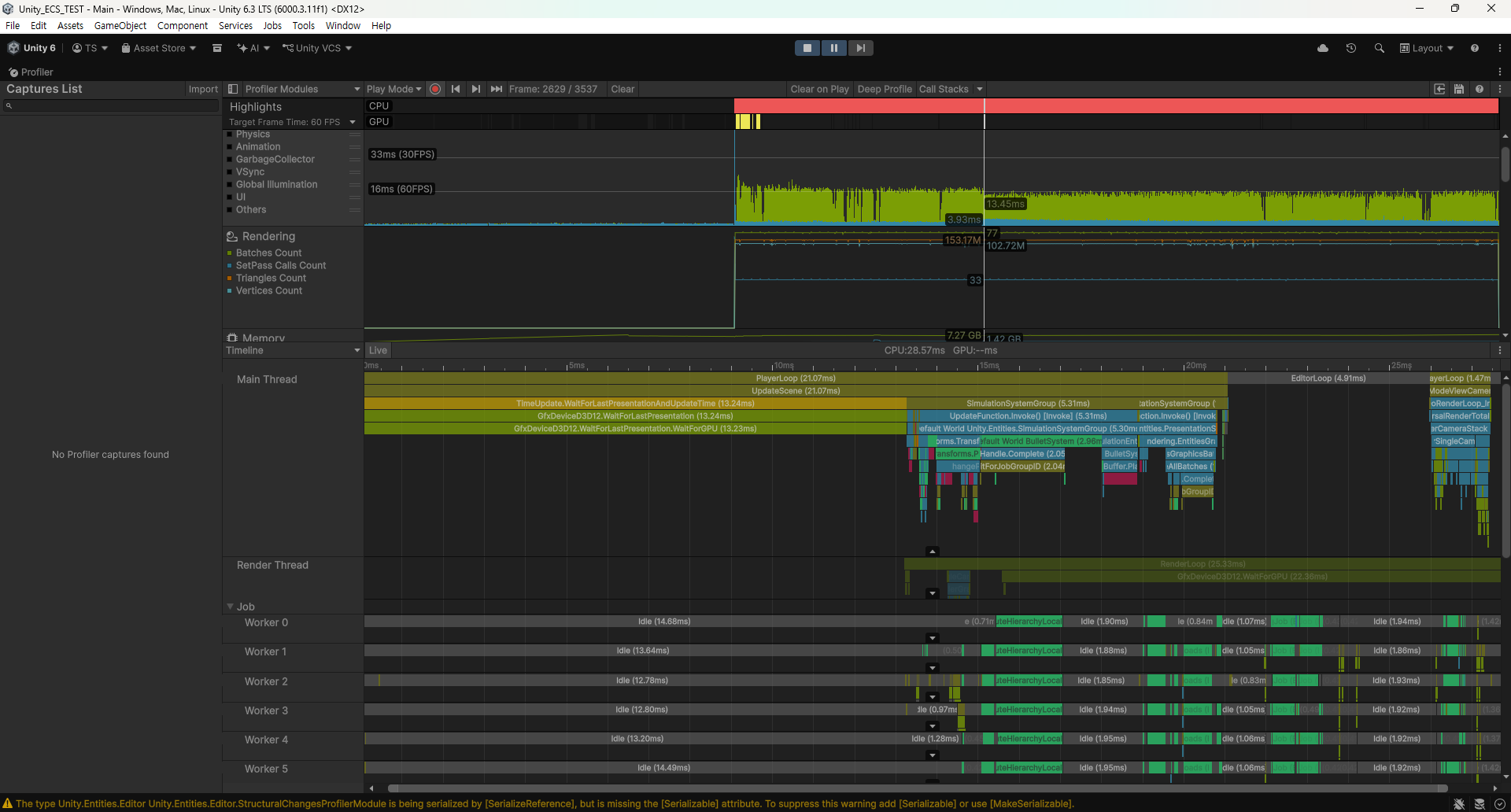
RigidBodies는 사라졌는데,WaitForGPU가 13ms나 차지하고 있다.- 처음 총알 프리팹의 Mesh를 기본 Sphere로 했는데, 이 삼각형의 수가 768개이다.
- 적 프리팹은 2,000마리의 Capsule 이지만 총알에 비해 상대적으로 숫자가 적어 미미했다.
- 사진에서 한 프레임의 삼각형의 수가 153.17M(1억 5,000만 개) 임을 확인할 수 있다.
- CPU의 작업은 끝났지만 GPU의 작업이 많아 CPU가 기다리는 것이다.
- Mesh를 Sphere에서 Cube로 변경하였다.
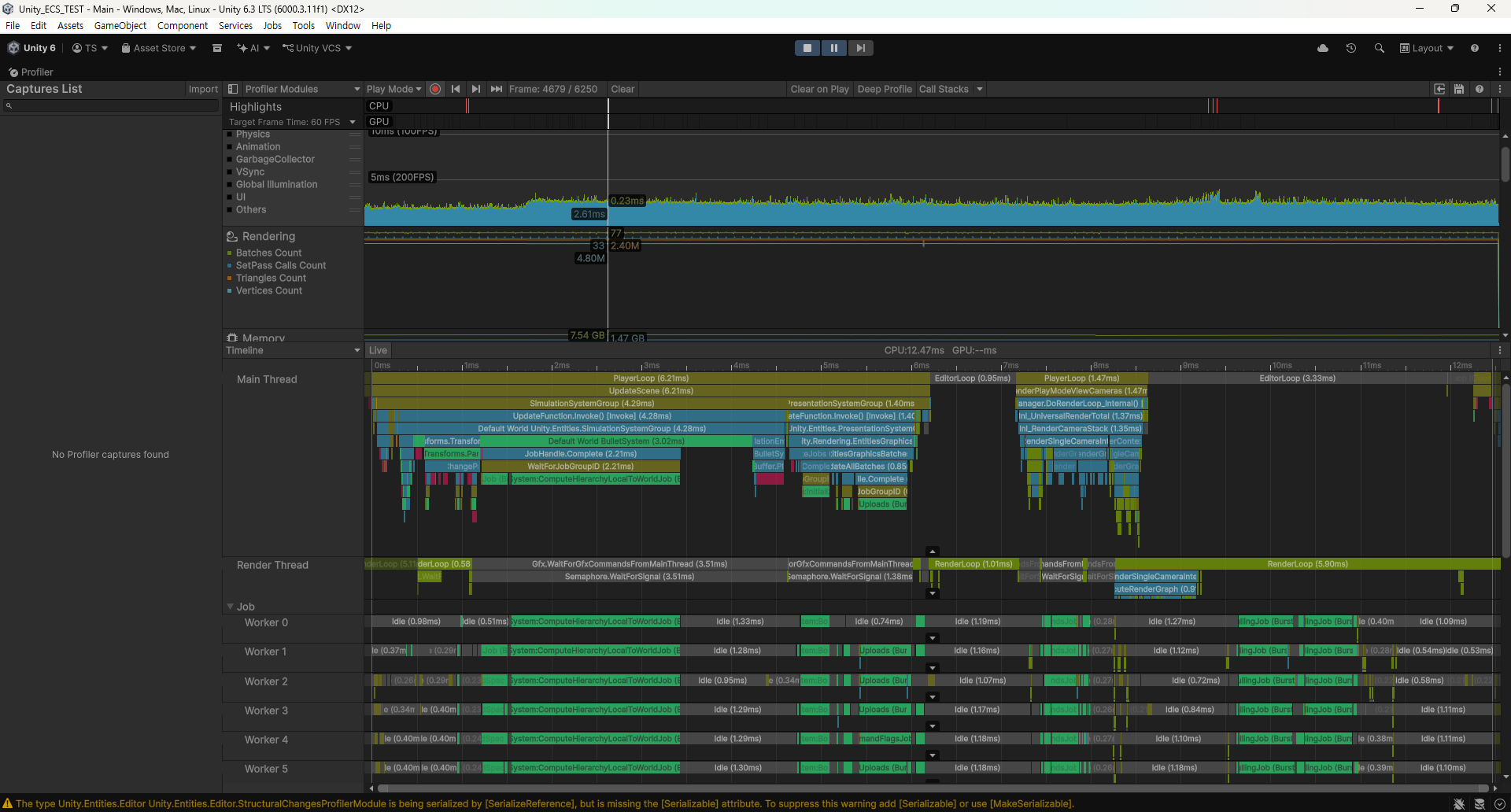
- 이제 한 프레임에 12.47ms 로 약 80fps의 출력을 확인할 수 있다.
- 삼각형의 숫자가 2.4M (240만 개)로 줄어듦을 확인할 수 있다.
충돌 시스템
csharp
public override void Update(float deltaTime)
{
  foreach(var stageObject in GameStage.currentStage.stageObjects )
  {
    if( stageObject is Enemy enemy)
    {
      float distanceToEnemy = Vector3.length(pos - enemy.pos);
      if( distanceToEnemy < radius )
      {
        // 적이 총알에 맞았을 때의 처리
        GameStage.currentStage.RemoveStageObject(this);

        enemy.AddDamage(this.power);
      }
    }
  }
}- 해당 의사코드를 그대로 구현한
WorstCollisionSystem을 제작할 것이다. - 해당 코드는 모든 총알이 개별적으로 갖는다.
- 시간복잡도 O(m * n) 을 갖는다.
WorstCollisionSystem
cs
partial struct WorstCollisionSystem : ISystem
{
    [BurstCompile]
    public void OnUpdate(ref SystemState state)
    {
        var ecbSingleton = SystemAPI.GetSingleton<EndSimulationEntityCommandBufferSystem.Singleton>();
        var ecb = ecbSingleton.CreateCommandBuffer(state.WorldUnmanaged);

        foreach (var (bulletTransform, bullet, bulletEntity) in SystemAPI.Query<RefRO<LocalTransform>, RefRO<Bullet>>().WithEntityAccess())
        {
            foreach (var (enemyTransform, enemy, enemyEntity) in SystemAPI.Query<RefRO<LocalTransform>, RefRO<Enemy>>().WithEntityAccess())
            {
                float3 bulletPos = bulletTransform.ValueRO.Position;
                float3 enemyPos = enemyTransform.ValueRO.Position;

                float distance = math.distance(bulletPos, enemyPos);
                float collisionRadius = bullet.ValueRO.Radius;
                float bulletDamage = bullet.ValueRO.Power;

                if (distance <= collisionRadius)
                {
                    ecb.DestroyEntity(enemyEntity);
                    // todo: enemyEntity에게 bulletDamage 입히기
                    break;
                }
            }
        }
    }
}- 세상의 총알과 적을
SystemAPI.Query<>로 가져와 거리를 비교한다. - 총알의 거리에 들면 적 개체를
DestroyEntity()한다.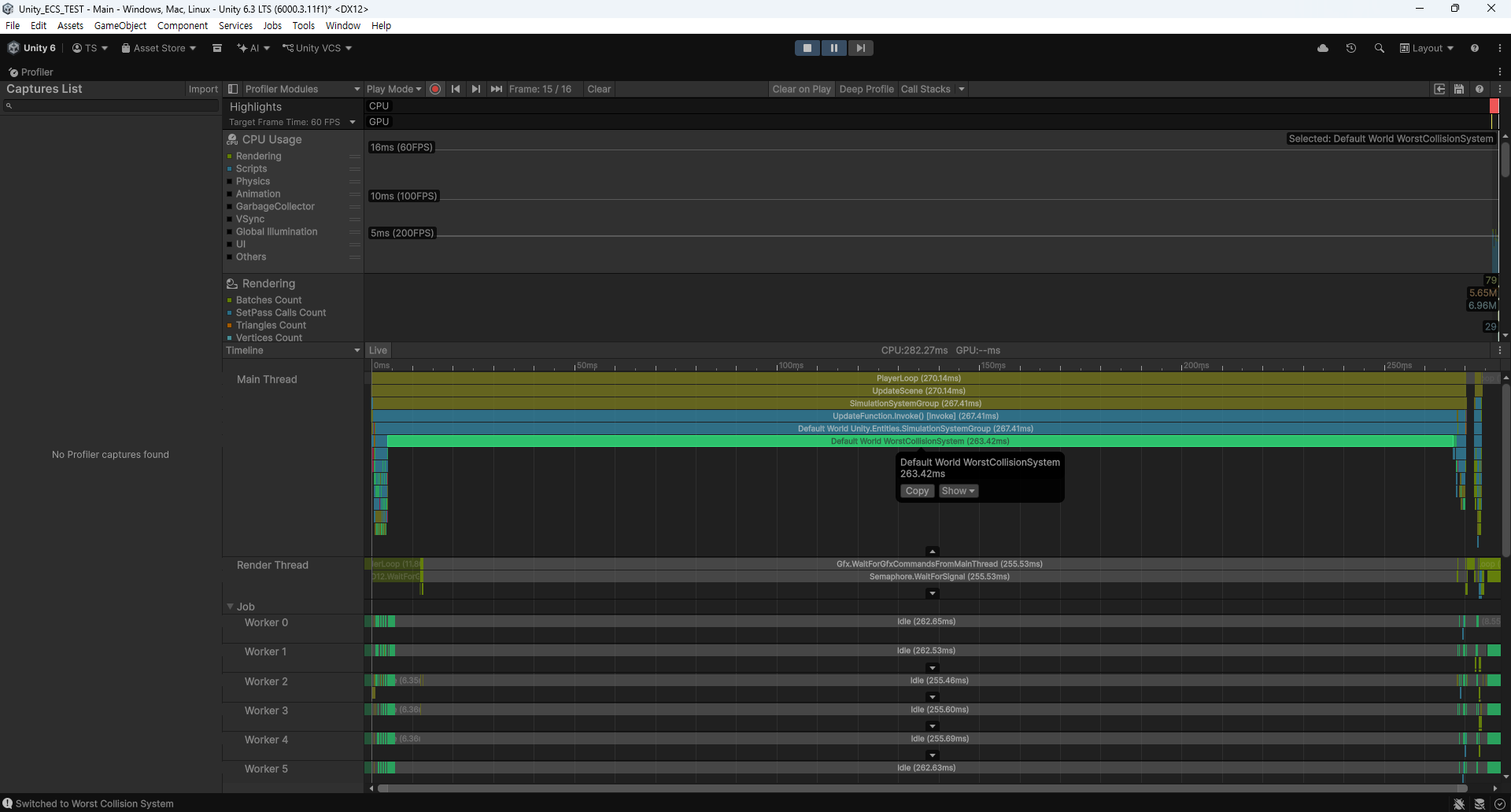
- Profiler로 확인했을 때, 282ms 중 263ms를 차지한다.(약 3.54fps)
BestCollisionSystem
공간 분할 알고리즘을 적용하여 HashMap<격자 번호, 적 개체>에 저장한다.
총알의 입장에서 총알 주위 9칸(3 * 3) 격자에 적 개체가 있는지 확인하고 없다면 충돌 검사를 하지 않는다.
cs
partial struct BestCollisionSystem : ISystem
{
    private const float CELL_SIZE = 10f;

    [BurstCompile]
    public void OnUpdate(ref SystemState state)
    {
        var ecbSingleton = SystemAPI.GetSingleton<EndSimulationEntityCommandBufferSystem.Singleton>();
        var ecb = ecbSingleton.CreateCommandBuffer(state.WorldUnmanaged);

        var enemyGrid = new NativeParallelMultiHashMap<int2, EnemyGridData>(1000, Allocator.Temp);

        foreach (var (enemyTransform, enemy, enemyEntity) in SystemAPI.Query<RefRO<LocalTransform>, RefRO<Enemy>>().WithEntityAccess())
        {
            float3 position = enemyTransform.ValueRO.Position;
            int2 cellCoord = new int2((int)math.floor(position.x / CELL_SIZE), (int)math.floor(position.z / CELL_SIZE));

            enemyGrid.Add(cellCoord, new EnemyGridData
            {
                Entity = enemyEntity,
                Position = position
            });
        }

        foreach (var (bulletTransform, bullet, bulletEntity) in SystemAPI.Query<RefRO<LocalTransform>, RefRO<Bullet>>().WithEntityAccess())
        {
            float3 position = bulletTransform.ValueRO.Position;
            float radius = bullet.ValueRO.Radius;
            int2 cellCoord = new int2((int)math.floor(position.x / CELL_SIZE), (int)math.floor(position.z / CELL_SIZE));

            bool hit = false;

            for (int i = -1; i <= 1; i++)
            {
                for (int j = -1; j <= 1; j++)
                {
                    int2 checkCell = cellCoord + new int2(i, j);

                    if (enemyGrid.TryGetFirstValue(checkCell, out var enemyData, out var iterator))
                    {
                        do
                        {
                            float distance = math.distance(position, enemyData.Position);

                            if (distance <= radius)
                            {
                                ecb.DestroyEntity(enemyData.Entity);
                                hit = true;
                                break;
                            }
                        }
                        while (enemyGrid.TryGetNextValue(out enemyData, ref iterator));
                    }
                    if (hit) break;
                }
                if (hit) break;
            }
        }

        enemyGrid.Dispose();
    }
}

struct EnemyGridData
{
    public Entity Entity;
    public float3 Position;
}- 첫 번째
foreach에서 모든 적 개체의 좌표를CELL_SIZE(격자 한 칸의 크기)로 나누어HashMap에 저장한다. - 두 번째
foreach에서 총알 주변의 3 * 3 격자를 순회하며 총알과의 충돌 판정을 계산한다. - 이때, HashMap(
enemyGrid)에 적이 있든 없든 일단 조회를 한다.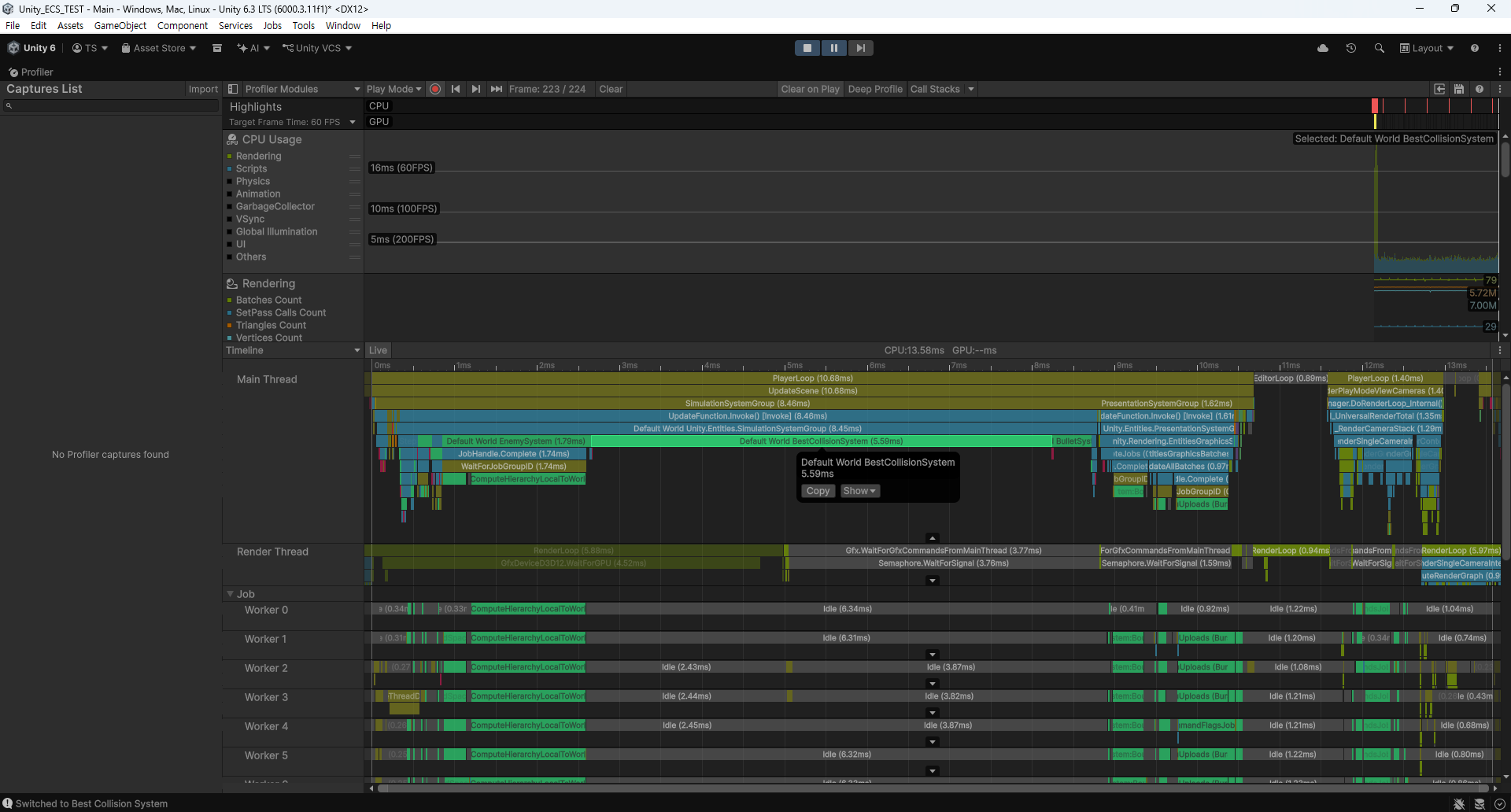
- Profiler로 확인했을 때, 13.58ms 중 5.59ms를 차지한다.(약 73.63 fps)
BitCollisionSystem
BestCollisionSystem과 똑같이 공간 분할을 하되 Bit 배열을 사용해서 적 개체가 있는 격자라면 비트를 켠다.
해시 조회를 하기 전 격자에 적이 없다면(Bit 배열이 0인 경우) 해시 조회를 하지 않는다.
cs
partial struct BitCollisionSystem : ISystem
{
    private const float CELL_SIZE = 10f;
    private const int GRID_SIZE = 200;
    private const int GRID_OFFSET = 100;
    private const int TOTAL_CELLS = GRID_SIZE * GRID_SIZE;

    [BurstCompile]
    public void OnUpdate(ref SystemState state)
    {
        var ecbSingleton = SystemAPI.GetSingleton<EndSimulationEntityCommandBufferSystem.Singleton>();
        var ecb = ecbSingleton.CreateCommandBuffer(state.WorldUnmanaged);
        var occupancyBits = new NativeBitArray(TOTAL_CELLS, Allocator.Temp, NativeArrayOptions.ClearMemory);
        var enemyGrid = new NativeParallelMultiHashMap<int2, EnemyGridData>(1000, Allocator.Temp);

        foreach (var (enemyTransform, enemy, enemyEntity) in SystemAPI.Query<RefRO<LocalTransform>, RefRO<Enemy>>().WithEntityAccess())
        {
            float3 position = enemyTransform.ValueRO.Position;
            int2 cellCoord = new int2((int)math.floor(position.x / CELL_SIZE), (int)math.floor(position.z / CELL_SIZE));

            int x = cellCoord.x + GRID_OFFSET;
            int z = cellCoord.y + GRID_OFFSET;
            if (x >= 0 && x < GRID_SIZE && z >= 0 && z < GRID_SIZE)
            {
                enemyGrid.Add(cellCoord, new EnemyGridData
                {
                    Entity = enemyEntity,
                    Position = position
                });

                // GetLinearIndex 인라인
                int linearIndex = z * GRID_SIZE + x;
                occupancyBits.Set(linearIndex, true);
            }
        }

        foreach (var (bulletTransform, bullet, bulletEntity) in SystemAPI.Query<RefRO<LocalTransform>, RefRO<Bullet>>().WithEntityAccess())
        {
            float3 position = bulletTransform.ValueRO.Position;
            float radius = bullet.ValueRO.Radius;
            int2 cellCoord = new int2((int)math.floor(position.x / CELL_SIZE), (int)math.floor(position.z / CELL_SIZE));
            bool hit = false;

            for (int i = -1; i <= 1; i++)
            {
                for (int j = -1; j <= 1; j++)
                {
                    int2 checkCell = cellCoord + new int2(i, j);
                    int checkX = checkCell.x + GRID_OFFSET;
                    int checkZ = checkCell.y + GRID_OFFSET;

                    if (checkX < 0 || checkX >= GRID_SIZE || checkZ < 0 || checkZ >= GRID_SIZE)
                    {
                        continue;
                    }

                    int linearIndex = checkZ * GRID_SIZE + checkX;

                    if (!occupancyBits.IsSet(linearIndex))
                    {
                        continue;
                    }

                    if (enemyGrid.TryGetFirstValue(checkCell, out var enemyData, out var iterator))
                    {
                        do
                        {
                            float distance = math.distance(position, enemyData.Position);

                            if (distance <= radius)
                            {
                                ecb.DestroyEntity(enemyData.Entity);
                                hit = true;
                                break;
                            }
                        }
                        while (enemyGrid.TryGetNextValue(out enemyData, ref iterator));
                    }
                    if (hit) break;
                }
                if (hit) break;
            }
        }

        occupancyBits.Dispose();
        enemyGrid.Dispose();
    }
}- 첫 번째
foreach에서 적 위치를 격자에 넣는 것은 동일하지만 추가로occupancyBits에 값을 켜준다. - 두 번째
foreach에서 3 * 3 격자를 순회할 때,occupancyBits.IsSet()값이 0이면 해시 조회(TryGetFirstValue())를 하지 않는다.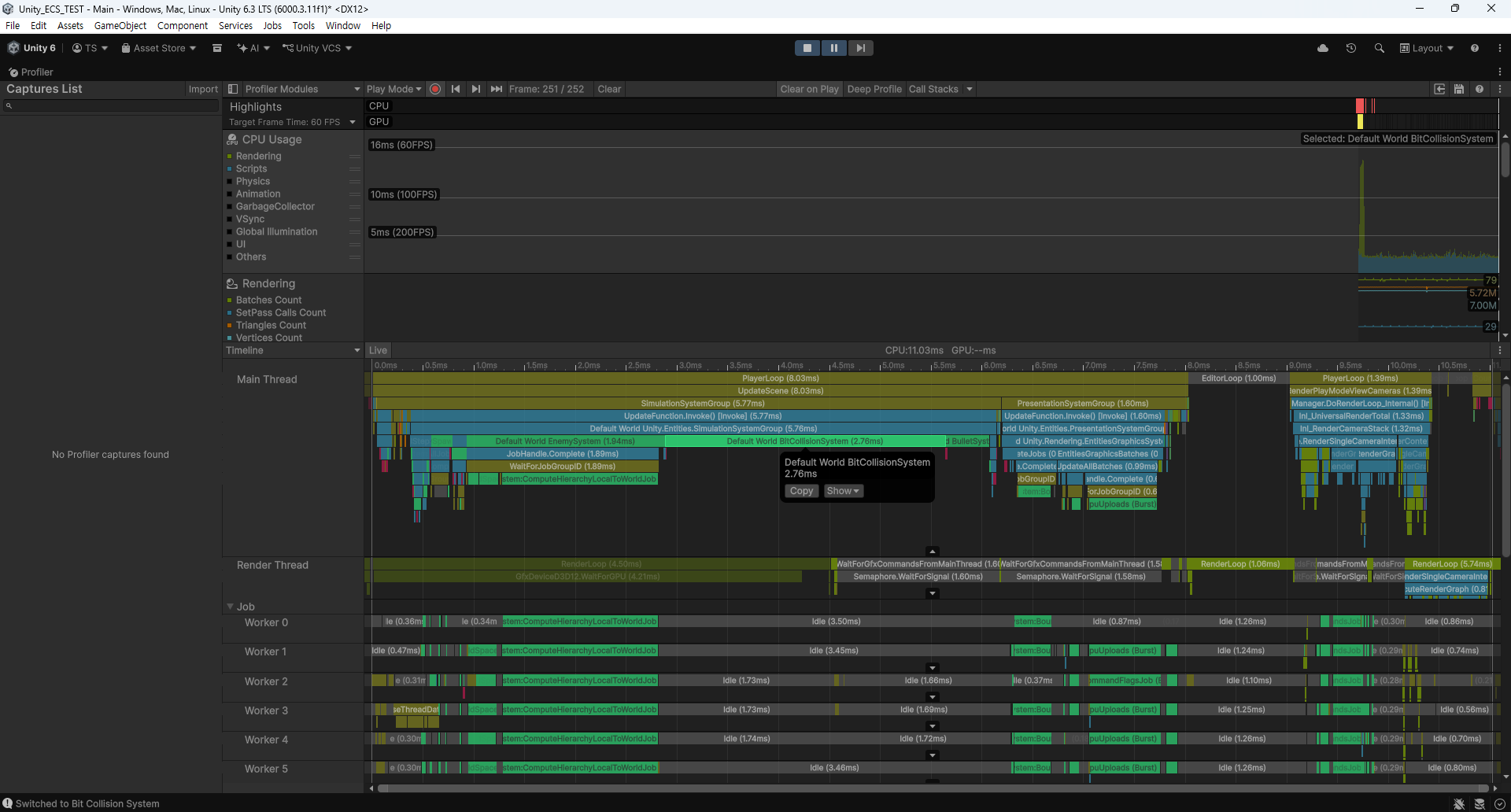
- Profiler로 확인했을 때, 11.03ms 중 2.76ms를 차지한다.(약 90.66 fps)
결과
- 100,000개의 총알이 있는 세상에서 2,000마리의 적이 있을 때, 모든 총알과의 충돌 계산을 하는 것은 성능이 나쁘다.
- 공간 분할을 통해 계산할 적의 숫자를 줄이는 것으로 3.54fps에서 73.63fps로의 성능 개선을 이룰 수 있다.
- 추가로 격자에 적이 없다면 해시 조회를 하지 않아도 되므로 HasMap 조회보다 연산이 빠른 Bit 조회로 적의 유무를 미리 알고 계산을 건너 뛰는 방법을 생각할 수 있다.
- 계산을 건너뛰게 된다면 73.64fps에서 90.66fps로의 성능 개선을 이룰 수 있다.
- 하지만 세상에 100,000개 총알 중 적의 비율이 적기 때문에 적과 총알의 비율이 같아지는 순간이 오면 성능이 역전될 수 있다.
- Unity Editor에서 적의 수를 20,000 정도로 늘리면
BestCollisionSystem이 성능이 좋아지게 된다. - 하지만 세상의 크기를 반지름이 1,000인 원으로 제한했기 때문에 충돌이 일어나지 않는 경우보다 충돌이 일어나는 경우가 더 빈번하다는 점을 고려해야 한다.
프로젝트는 여기에서 확인하실 수 있습니다.